Your on-call weeks, without everyone else’s.
Paste the team’s Rootly calendar link. You get back a live link that shows only your shifts, and your calendar keeps it up to date.
Where do I find this link?
- Open your team’s schedules in Rootly and pick the schedule you are on.
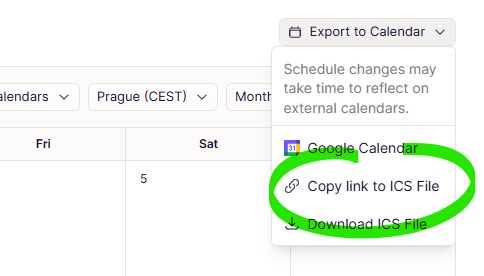
- At the top right, open Export to Calendar.
- Choose Copy link to ICS File — not “Google Calendar”, which would subscribe you to everyone’s shifts.
- Paste the link above. It starts with
https://rootly.com/.
Why does this app keep my Rootly link?
Your filtered calendar is not a copy. Each time your calendar app refreshes it, this app fetches the Rootly feed again and filters it on the way through — so new shifts and swaps show up without you doing anything. That only works if the Rootly link is stored.
Treat the Rootly link like a password: anyone holding it can read the whole team’s schedule.
Who can see my filtered calendar?
Anyone who has its link — it is unlisted, not protected by a login. Nobody can find it by browsing, and it cannot be worked out from the Rootly link, but share it only with people you would show your on-call schedule to.
Every week is someone’s. Which ones are yours?
Your weeks stand out; everyone else becomes an optional marker.